If you work with Excel you will likely have discovered that you can easily format numbers in your spreadsheet. In the middle of the Home tab, there’s a Number group that contains buttons for Accounting Number format, Percentage and Comma.
Unlike, say, the Bold button, which can be used to apply and remove Bold formatting, the number formatting buttons only apply formatting. Clicking on them a second time does not remove the number formatting.
How, then, do you get rid of number formatting? The Clear Formats command (Home tab, Editing group, Clear button) gets rid of all formatting, not just number formatting.
The answer? In the Number group, there’s a drop-down list above the buttons and it usually shows General. If you have applied number formatting it might show Percentage, Accounting or Custom.
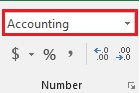
If you want to only get rid of number formatting, click on the drop down and select General.