AutoCorrect is a useful feature as it can fix common spelling and typing mistakes. It’s AutoCorrect that replaces hte with the and probelm with problem.
What’s really handy about AutoCorrect is that you can add your own entries to the list. If you have words that you commonly misspell or mistype you can add them to AutoCorrect and the software will then automatically substitute the correct word for you.
If you wanted to add your own entries to AutoCorrect you can access the dialog box as follows:
- File tab
- Options command
- Select Proofing in the navigation pane on the left
- Click on the AutoCorrect Options button
As an alternative, you can create AutoCorrect entries from the spellchecker in Excel and Outlook.
For instance, I frequently mistype document as documnet. In Outlook and Excel, when I run the spellchecker and for the umpteenth time I’m looking at replacing documnet with document, I could click on the AutoCorrect button instead and create an entry for documnet. Then every time I type documnet in any of the MS Office programs, AutoCorrect automatically replaces it for me and by the time I get to spellcheck there isn’t a problem.
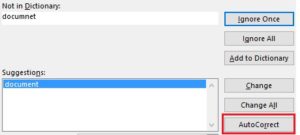
In Office 2010, all the programs had an AutoCorrect button in the spellcheck but unfortunately it disappeared in later versions of Word and PowerPoint so it is only Outlook and Excel that still have it in the more recent versions.