Using the Navigation Pane in Word to rearrange headings in the document
In last week’s tip we looked at how you can use the Navigation Pane to quickly move around in a larger document. If you missed it, here’s a fresh link. …

In last week’s tip we looked at how you can use the Navigation Pane to quickly move around in a larger document. If you missed it, here’s a fresh link. …
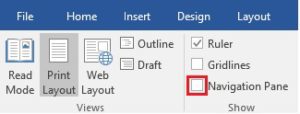
If you are working with a large document in MS Word such as a Policy Manual or a Report, you will likely have used heading styles to format headings in …
Subscriber Theresa M. asks: ‘We send out letters and follow up 45 days after the initial letter. We have a formula to calculate the dates but the dates need to …
Subscriber Maggie C. asks ‘How can I change the font size in a new message’. Outlook uses the Calibri font and a font size of 11pt for new messages. I …
If you include a large number of pictures in a PowerPoint presentation you may find the size of the file balloons as each picture can be several megabytes in size. Compressing …
I have several email accounts, one of which I have had for over 20 years and I hardly ever use it these days. Emails sent to it are still delivered …

This week’s tip was suggested by subscriber Danielle C. I have two signatures in Outlook: Full, Replies. I use Full with new messages and Replies when I reply or forward …
Chatting with subscriber Barry S. about last week’s tip and he mentioned he also finds it annoying that when he opens a Word document that’s an email attachment it opens …

Protected View in MS Word is a read-only view that is used to protect your PC if you open a file from a potentially unsafe location such as an Email …
As you likely, know if you want to select multiple files in Windows Explorer, you can press and hold the Ctrl key and then select the files you want. This …