Sometimes I want to use a font or fill colour that is already in use in a document in other places in the document, so I want to find out want the colour is.
It’s easy. Just click on the cell or text that has the colour applied and then click on the drop-down arrow next to the Font or Fill button. The colour you are using will be highlighted with a small red box.
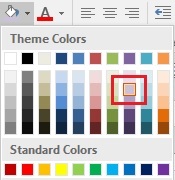
You can make a mental note of where the colour is in the grid and then use it at another location.
And, yes, the Format Painter can copy the colour for you but it copies all formatting and you may not want to copy some of the other formatting elements.