Open a file as Read-Only
Let’s say you have a budget in Excel that is the final version but you want to open it and do a few casual ‘what if’ projections with it. As …
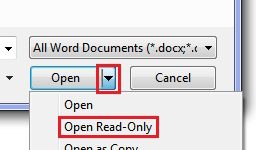
Let’s say you have a budget in Excel that is the final version but you want to open it and do a few casual ‘what if’ projections with it. As …

Subscriber Maki K. asks ‘in Excel how do I show $8,607 as $9,000 and $43,035 as $43,000?’. The answer is the ROUND function. You may be familiar with the ROUND …
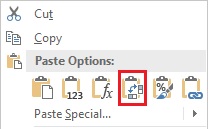
Sometimes in Excel you might create a spreadsheet and after using it for a while decide you want to switch the rows and columns. So it looks like this: But …
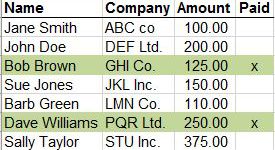
If you have rows of data in an Excel spreadsheet it can sometimes be handy to highlight the row based on the value in one of the cells in that …

Subscriber Jean K. asks ‘Is there a way in Outlook to zoom in to make the text in an email larger?’ If you have opened the message, as opposed to …

If you occasionally find yourself in a Word document or Excel spreadsheet applying the same formatting to different parts of the file, then F4 will come in handy as it …
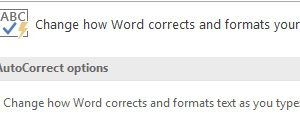
Subscriber Cal J. asked ‘What to do when you want (c) rather than ©?’ You have couple of ways to approach this. If you sometimes want to use the c …
Want to quickly add a copyright symbol, ©, or trademark symbol, ™, to a document? Just type (c) or ™ and Autocorrect will insert the symbols for you. This works …

Want to quickly add a copyright symbol, ©, or trademark symbol, ™, to a document? Just type (c) or ™ and Autocorrect will insert the symbols for you. This works …
Subscriber Theresa M. asks: ‘We send out letters and follow up 45 days after the initial letter. We have a formula to calculate the dates but the dates need to …