Using the Navigation Pane in MS Word to quickly move around in a large document
If you are working with a large document in MS Word such as a Policy Manual or a Report, you will likely have used heading styles to format headings in …
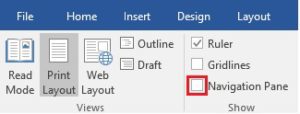
If you are working with a large document in MS Word such as a Policy Manual or a Report, you will likely have used heading styles to format headings in …
Chatting with subscriber Barry S. about last week’s tip and he mentioned he also finds it annoying that when he opens a Word document that’s an email attachment it opens …

When you are selecting text in MS Word you will likely have discovered that you can start dragging anywhere in the first word you want to select and as you …
Subscriber Dinar S. asks: When you copy/paste in Word, is there a way to match the format that is currently being used without using the mouse? In all the Office …
Do you sometimes find yourself wanting to take a peek at a file you are about to open in Word? Maybe you are looking for a specific file and you …
Want to rearrange the items in a bulleted list? Here’s a shortcut to make the job easier. Click on an item you want to move then press Alt+Shift+Up Arrow to …
Starting with Office 2007 you can customize the Status Bar in all the Office programs. As you likely know, the Status Bar is at the very bottom of the window, …
Starting in Office 2007, Microsoft provided the capability to create PDFs directly from all the Office programs. This was a boon for Office users as we no longer needed a …
You might occasionally want to experiment with a feature in Word but you may not have a suitable document to use. For instance, you may want to add sections to …

This week we are going to look at how you can automatically add space after a paragraph in Word when you press Enter. Spacing After is a paragraph formatting option. …