In Word you can add a watermark, such as Confidential, Draft or Final Version, to your document. The watermark prints on every page in the document and it usually appears as faint grey text in the background.
Add a watermark in Word 2010:
- On the Page Layout tab in the Page Background group, click on the Watermark button
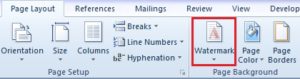
- Select one of the predefined options or click on Custom Watermark
- If you choose Custom Watermark, the Printed Watermark dialog box is displayed
- Select the Text watermark radio button
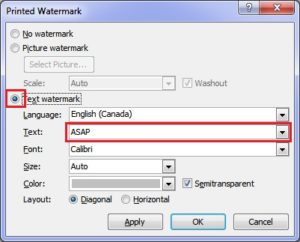
- In the Text drop-down list choose a predefined option or enter your own text
- Select formatting options as needed
- Click on Apply to preview the watermark
- When you are finished, click on OK
In Word 2013 and 2016, the Page Background group is on the Design tab.
To remove a watermark, click on the Watermark button and select Remove watermark.