In the later versions of Word, Excel and PowerPoint, Microsoft implemented a Start Screen which is displayed when you launch the program. The Start Screen has a list of recently used files on the left as well as thumbnails for templates and tutorials.
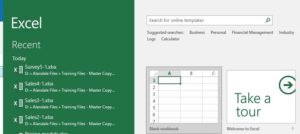
I invariably always click on Blank workbook/document so find it annoying that I need an extra click to get past the Start Screen and get started.
Well the good news is you can disable the Start Screen option:
- File tab, Options
- In the Options dialog box, with General selected in the navigation pane on the left, look at the bottom of the window (you many need to scroll down)
- Clear the Show the Start screen when this application starts check box
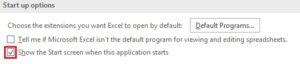
- Click on OK
Repeat as needed in Word, Excel and PowerPoint.