When working in Word, Excel, Outlook and PowerPoint, I find I often want to increase or decrease the font size of some of the text by a size or two. Rather than use the Font Size drop-down list, recent versions of MS Office have an Increase Font Size button and Decrease Font Size button next to the drop-down list.
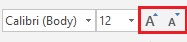
If you only want to make a small adjustment in the font size these buttons can be very handy.
And for those of you who like keyboard shortcuts, Increase Font Size is Ctrl+Shift+> and Decrease Font Size is Ctrl+Shift+<