Ever had the situation in Excel where you want a number that has leading zeros? So when you enter 123 you want to see 000123 displayed in the cell.
One option would be to enter the number as text. So for 123, I’d enter ‘000123. That’s an apostrophe in front of the number.
A better solution is to create a custom number format:
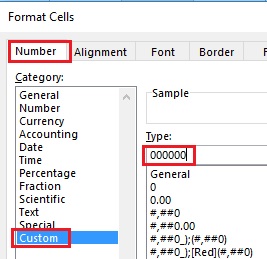
- Right-click on the cell and select Format Cells
- In the format cells dialog box, on the Number tab, select Custom in the list of categories
- Underneath Type: where it probably says General, enter a zero for each position.
- Click on OK
In my example above, I want to have six numbers displayed so in step 3 I’d enter 000000.