You can use SmartArt in PowerPoint to make your slides more visually interesting. If you have a slide with fairly short lines of bulleted text, say four to six words, you can easily convert the bulleted text to a SmartArt diagram.
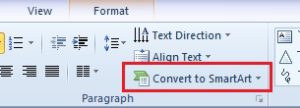
To convert bullets to SmartArt:
- Click in the placeholder (you don’t need to select the bullets)
- On the Home tab in the Paragraph group, click on the Convert to SmartArt button
- Select a diagram (note that when you point to a diagram you will see a preview of it on the slide)