Use F4 to repeat the last command
If you occasionally find yourself in a Word document or Excel spreadsheet applying the same formatting to different parts of the file, then F4 will come in handy as it …

If you occasionally find yourself in a Word document or Excel spreadsheet applying the same formatting to different parts of the file, then F4 will come in handy as it …
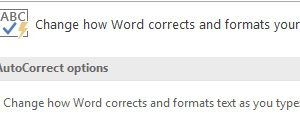
Subscriber Cal J. asked ‘What to do when you want (c) rather than ©?’ You have couple of ways to approach this. If you sometimes want to use the c …

Want to quickly add a copyright symbol, ©, or trademark symbol, ™, to a document? Just type (c) or ™ and Autocorrect will insert the symbols for you. This works …

In last week’s tip we saw that you can use F5 to start a PowerPoint presentation once you have opened the file. While this works, I think a much better …

Have you ever been in a business meeting and you see the presenter open a PowerPoint file and then struggled to launch the presentation. You can use the Slide Show …

Want to quickly add a copyright symbol, ©, or trademark symbol, ™, to a document? Just type (c) or ™ and Autocorrect will insert the symbols for you. This works …
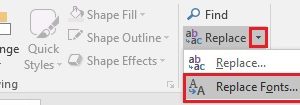
To make your PowerPoint presentation as effective as possible you want the formatting to be very consistent. If you have imported slides from other presentations or if several people have …
If you include a large number of pictures in a PowerPoint presentation you may find the size of the file balloons as each picture can be several megabytes in size. Compressing …
Let’s say you are developing a presentation in PowerPoint and you want to see what the slides will actually look like when you run the presentation. No need to use …
If you have a picture or shape on a slide in PowerPoint, you may sometimes want to only move it in the same vertical or horizontal plane. How do you …