My favourite tips of 2018
As this will be the last tip of the year I thought I’d highlight some of my favourite tips from 2018. If you joined the list part way through the …

As this will be the last tip of the year I thought I’d highlight some of my favourite tips from 2018. If you joined the list part way through the …

I sometimes end up with lots of tabs open in my browser so decide to declutter and close a few of them. When doing this I sometimes accidentally close a …
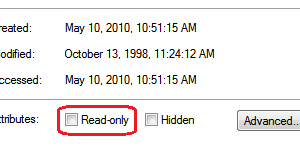
On occasion you may have a file that you want to open and use but you want to be sure you don’t accidentally save any changes. Maybe it is the …
When using your browser, you may occasionally want to return to your Home Page and I am sure you have found the Home button on the toolbar. Yet if your …

Web browsers have a couple of handy features that you may not have run across. Pin a tab. I have a few sites that I always open whenever I open …

Google is the most popular search engine and I am sure many of you use it for your searches. What you may not know is that Google has a built-in …
For about the last year I’ve been using a very useful website & app that keeps track of and manages all my passwords. It’s such a useful tool I wanted …
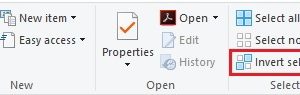
File Explorer (or Windows Explorer as it used to be called) has a handy feature that makes it easy to select most of the files in a folder. Let’s say …
As you work on your PC, you might occasionally get an unexpected error message popping up on the screen. In these instances, you probably want to capture the message so …

As you open more and more programs on your system, the Taskbar can get quite cluttered. If you turn on the Small Icons feature in Windows you’ll be able to …