My favourite tips of 2018
As this will be the last tip of the year I thought I’d highlight some of my favourite tips from 2018. If you joined the list part way through the …

As this will be the last tip of the year I thought I’d highlight some of my favourite tips from 2018. If you joined the list part way through the …

I sometimes end up with lots of tabs open in my browser so decide to declutter and close a few of them. When doing this I sometimes accidentally close a …

Developing a one-page document in Word to put up on a notice board? Want to spice it up and make it more visually interesting and fun? Then use Page Borders. …
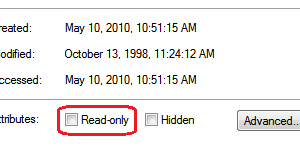
On occasion you may have a file that you want to open and use but you want to be sure you don’t accidentally save any changes. Maybe it is the …

When you are working with a large Word document you might sometimes what to quickly get to a specific page in the document. Maybe there is a table on the …
You can use AutoCorrect to save keystrokes for phrases you commonly use. I often talk about step-by-step instructions in my proposals and emails. My typing skills or OK but words …
Want to use the cent symbol in a Word document and don’t want to search for it in the symbols? Just use the keyboard shortcut: Ctrl+/, c.
These work in all the MS Office programs: F4 – Repeat the last command. Useful if you are doing repetitive formatting in a file F7 – Run the Spellcheck F12 …
If you want to quickly move the insertion point to the first cell in a row of a Word table, press Alt+Home. And the last cell in the row? Alt+End

If you have a large table that maybe spans several pages in your Word document, getting to the first or last row in the table may not be quick if you …