Colour alternating rows in an Excel worksheet – Option 1
In a large spreadsheet that has many columns of data it can be difficult following a specific row as you scroll to the right. This is especially true if you …
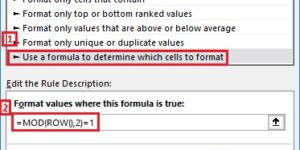
In a large spreadsheet that has many columns of data it can be difficult following a specific row as you scroll to the right. This is especially true if you …

You can use AutoCorrect to save keystrokes for phrases you commonly use. I often talk about step-by-step instructions in my proposals and emails. My typing skills or OK but words …

Let’s say you set up a recurring appointment or meeting and one of the occurrences falls on a stat holiday. You want to move that one occurrence to the next …

One of the first things most Excel users quickly discover is how to change the font, font size and colour of text in cell. However, you may not have discovered …

Want to use the cent symbol in a Word document and don’t want to search for it in the symbols? Just use the keyboard shortcut: Ctrl+/, c.
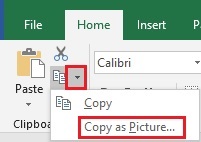
You might occasionally have data in Excel that you want to include in an email, PowerPoint presentation or Word document. When you paste the cells into the email, presentation or …

Web browsers have a couple of handy features that you may not have run across. Pin a tab. I have a few sites that I always open whenever I open …

Surfing the web and run across a page you want to bookmark so you can come back to it later? What’s the quickest way to bookmark the page? Press Ctrl+D. …
Google is the most popular search engine and I am sure many of you use it for your searches. What you may not know is that Google has a built-in …
These work in all the MS Office programs: F4 – Repeat the last command. Useful if you are doing repetitive formatting in a file F7 – Run the Spellcheck F12 …